
Smart Event Registration in India: The Complete Guide to Check-In, Badges, Access Control & Attendance Intelligence (2026)
The Registration Counter Problem Nobody Talks About
After a few months of planning, you have prepared the perfect corporate event. The setting is truly beautiful. The speakers have been confirmed. This is a very busy program.
At 9:55 AM, the first 200 guests arrive at the same time.
Queues form. Paper lists appear. A person is missing his or her name. A badge has been incorrectly spelled. VIP entrance is closed. Three staff members are having a dispute over who owns this file.
Half of your guests are still out at 10:30 AM, the time of your event. The first impression of your event is a Queue.
It’s the registration issue. And it can be completely prevented.
Smart event registration is more than just about check-in. It’s a full data platform from online registration until they leave the venue. The more you put into it before it happens, the smoother, richer, and more measurable your event will be.
Now let’s take a look at all the elements of a smart event registration system — explained simply in the order that guests will encounter them.
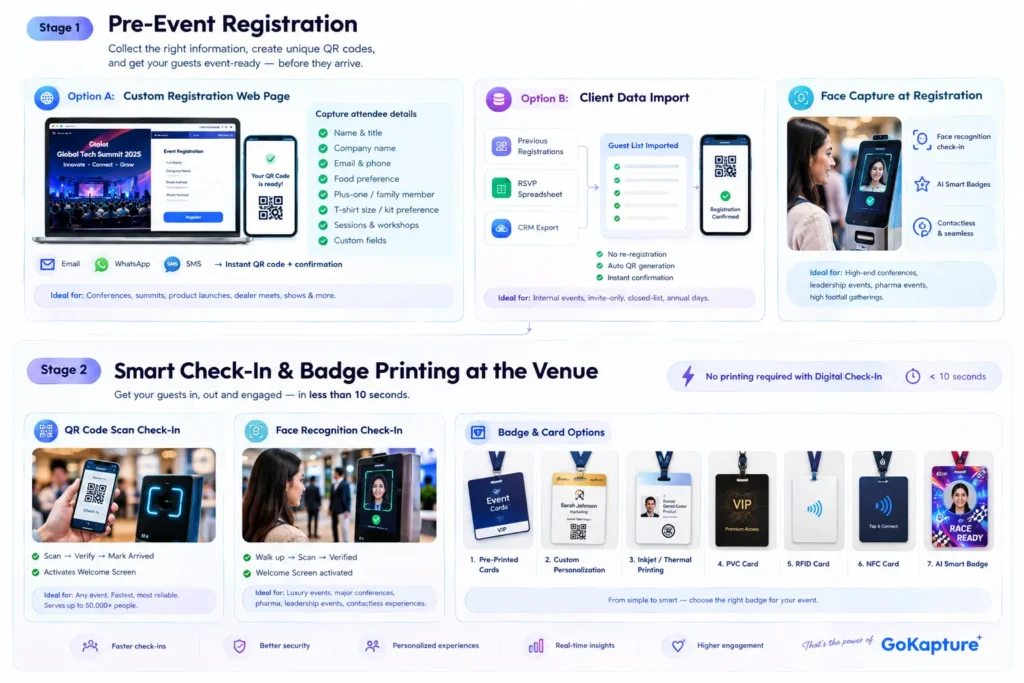
Stage 1: Pre-Event Registration
It all begins before the event day. The possibilities for the day are limited by how guests’ information is gathered prior to the event. There are two starting points to GoKapture.
Option A: Custom Registration Web Page
GoKapture creates a customised registration landing page for your event with your event theme, your colours, your logo, and a form that you can fully customise.
- Your form will be able to gather.
- Complete name and title
- Company name
- Email address and cell phone number.
- Food preference (vegetarian/non-vegetarian/vegan /Jain)
- Details of the plus-one/family member.
- T-shirt size or preference for kit.
- Sessions and/or workshops.
- Any customized fields your event needs.
After filling out the form, the system immediately generates a unique personalized QR code and notifies the guest through email, WhatsApp, and SMS.
Ideal for: Any event with open or rolling registration where people need to sign up over time, such as a conference, summit, dealer meet, product launch, show, etc.
Option B: Client Data Import
This option imports data from clients. This option loads data from clients.
GoKapture integrates with existing guest lists — from previous registrations, an RSVP spreadsheet, or a CRM export. No re-registration required. The system creates QR codes for all guests in the system and automatically sends confirmation.
Ideal for: Internal company events, invite-only events, closed-list events, annual days when HR already has a full employee database.
Face Capture at Registration
Why this is important: A picture taken at registration serves as the basis for two of the strongest smart event technology experiences. Face Recognition Check-In implies that the face is already associated with the data; the guest steps into the gate without presenting anything. In AI Smart Badge Pre-Generation, the badge is created beforehand and will print at sign-in time.
The idea is straightforward, the more data that’s gathered beforehand, the more smooth and personalised the day will be.
Ideal for: High-end conferences, leadership events, high-attendance events, any event using face recognition / AI Smart Badges.
Stage 2: Smart Check-In & Badge Printing at the Venue
This is the time when visitors land. It should be less than 10 seconds. It does with GoKapture’s intelligent check-in and event registration system.
No printing required with Digital Check-In
QR Code Scan Check-In
Guest shows guest code (on their phone, printed or sent via e-mail). It is instantly read by the GoKapture scanner, confirms their registration, then marks them as arrived and activates the Welcome Screen.
Ideal for: Any event — QR is the fastest, most universal, reliable check-in system. Serves up to 50,000 people for events. The preferred check-in approach for most business functions.
Face Recognition Check-In
If the guest’s picture is taken at the check-in line, this practice is simply extended by walking to a camera kiosk. If the photo is taken at the registration line, they proceed to a camera kiosk. They are picked up in real time by the system, confirmed, and the Welcome Screen activated — all without the guest touching anything or presenting anything.
Ideal for: luxury corporate events, major conferences, pharmaceutical conferences, leadership conferences, and events that require a contactless experience. Very good for high footfall events with a high-speed-at-gate requirement.
Badge & Card Options
1. Pre-Printed Cards — Sorted on Arrival
Prior to the event, all the cards are printed, and the cards are sorted in alphabetical order. Staff find and present the card from the appropriate section to the arriving guest, on presentation of their name.
Ideal for: Small functions (less than 100 people) with a definite guest list confirmed in advance. Best for intimate CXO dinners, closed board meetings, or events for small groups of partners, where new attendees are not anticipated, and the list is known and fixed early.
2. Customizable Personalization for Cards and Tickets
Event branding and design is pre-printed on the card. When guests check in, a fast sticker printer is used to customize a sticker with the name, designation, and QR code, and then affixed to the guest’s card at check-in.
Ideal for: Mid-size corporate events (100-500) where brand-specific card quality is important but full on-demand printing is not necessary. The most cost-efficient method to have a high-quality, customised badge for mass distribution.
3. Inkjet / Thermal Direct Printing on Card
It is a pre-printed card that has the guest name, photo, and information printed on it at check-in, using an inkjet or thermal printer. No sticker required. It only takes a couple of seconds to prepare the card.
Ideal for: Large corporate events and conferences with the need for photo-on-badge and speed of printing. For large events (500+ attendees), thermal printing is the quickest option for high-throughput check-in.
4. PVC Card
A PVC printer makes a hard plastic card, like a credit card, with details, photo, and name of the guest.
Ideal for: Small events with a high value that make the badge a part of the premium experience. For CXO events, leadership summits, exclusive dealer events, and anytime the guest may have a need to keep the card as a memory of the event afterwards.
5. RFID Card Issuance
A radio frequency identification (RFID) chip is installed in the card or wristband with a guest’s registration information. Guest taps their RFID card at any access point during the event including session entries, food counters, goodie bag collection, VIP areas. All taps are logged.
Ideal for: Large conferences or exhibitions with multiple zones, sessions and access levels. Any event where it is operationally important to track how visitors move around between areas, be it a pharma conference, a multi-day exhibition or a dealer meet with access levels.
6. NFC Card Issuance
NFC cards can be used with a regular mobile phone. Besides their normal access control, the guest can tap their card to a phone to share information like contact details, access to the event content or exchange digital business cards.
Ideal for: B2B-focused events, such as networking sessions, tech conferences, investor get-togethers, and association summits where the exchange of contact details is a central goal. No business cards are required with NFC — each guest tap is a contact exchange.
7. AI Smart Badge – Gokapture’s Signature
Guest’s photo is taken at the check-in (or retrieved from the registration if already taken) GoKapture’s AI system transforms the photo according to the event theme set by the client. The face of the guest is put into a picture themed around an F1 racing driver, a superhero, an astronaut, a historical figure or any character drawn by the guest. This themed portrait will be printed on the badge and given to the guest at check-in.
Each guest exits with his/her own face on a badge in a setting they’ve never encountered before. They photograph it. They share it. They store it for several years.
For qure.ai’s Grand Prix event, GoKapture did this for all the attendees—each was handed a badge featuring an F1 driver’s face in a qure.ai racing suit. The badges turned out to be the highlight of the show as far as taking and sharing pictures of them was concerned.
Ideal for: Brand activations, product launches, corporate events, days and anniversaries, premium conferences — any event that the badge should not be a mere identification piece but should be an experience itself. The AI Smart Badge serves as a registration credential and memory to take home.
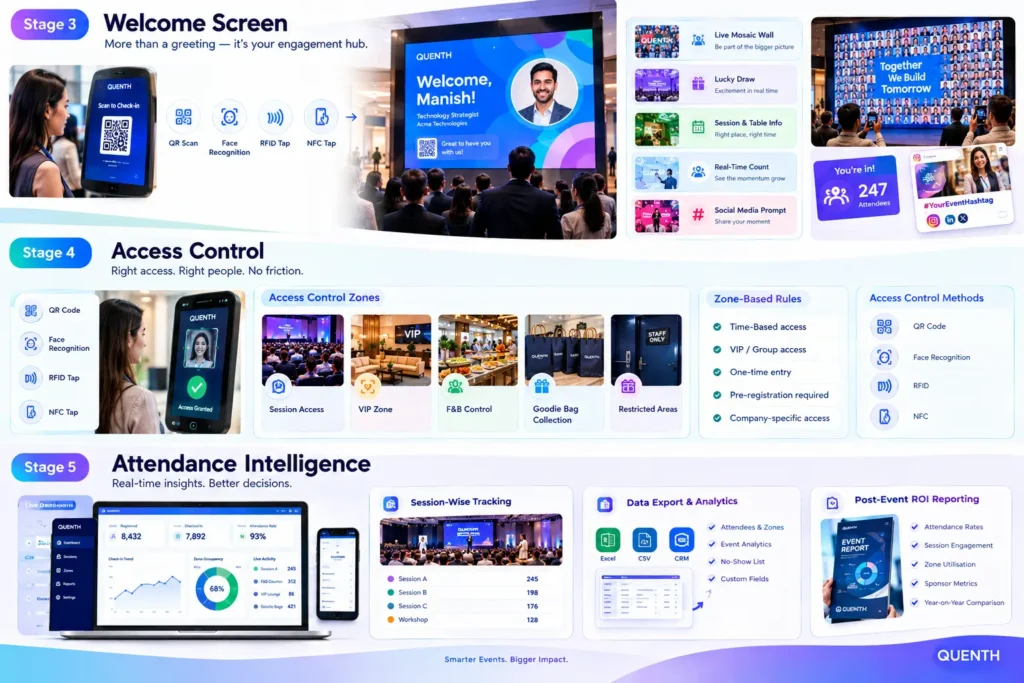
Stage 3: Welcome Screen
All check in options (QR scan, face recognition, RFID tap, NFC tap) display the Welcome Screen at the entry point.
Once a guest is confirmed the following large screen at the gate displays:
“Welcome, Manish.”
In the event’s branding, colours and visual language with the guest’s name, designation, company and any personalised message the client chooses to indicate.
However, the Welcome Screen is more than just a welcome message. GoKapture integrates the following experiences into it:
Live Mosaic Wall Integration
If a picture is taken at the check-in or registration, each guest who registers will contribute a picture as a tile to a mosaic on the main screen. The start is light at the beginning of the day. The mosaic expands as people come, with tile added to the photo mosaic wall, one after the other until all the guests are part of one big composite picture. The main screen displays a full mosaic of all participants at the event when it starts.
A fantastic idea for a display wall near the entrance or the main stage screen – it’s a natural social moment for guests to look for their own photo in the mosaic.
Ideal for: Annual days, large conferences, gala nights, family days, team building events or any gathering where being part of the group and having shared experiences is of paramount importance to the purpose of the gathering.
Lucky Draw Integration
All check-in entries automatically go towards a live lucky draw, enabling live event gamification. Names or numbers of guests are displayed in real time on the Welcome Screen as they arrive, creating anticipation during the period of their arrival. Ideally the draw can be made during the event, whether it be the opening session, lunch time or the closing ceremony; the winner can be made to walk on the main screen in a dramatic way.
Read more here: Crowd Games for Events-Formats, Ideas & How They Work
Ideal for: Dealer meets, channel partner events, annual days, sales conferences, and any event where prizes and rewards are a part of the engagement strategy. Early arrival is achieved through lucky draws and guests arrive on time when they know the draw may occur at any time.
Personalised Session & Table Assignment
The Welcome Screen displays the guest their breakout, workshop time, table number, or seating area without the need for printed seat maps or staff directions at the door.
Ideal for: Multi-Session conferences, gala dinners with assignments, workshops with limited groups, or any event that has complex logistics that guests must deal with on arrival.
Real-Time Arrival Counter
You’re the 247th person to come in today. An on-going count of participants alongside the welcome message promotes a feeling of energy and momentum, plus the organiser receives a live count of how fast the event is filling up.
Ideal for: Large conferences and exhibitions where timeliness of arrivals is a concern for session scheduling and arrangements.
Social Media Prompt
Along with the welcome message, there was a reminder to share your arrival — #YourEventHashtag — to get your guests to post about the event at the peak of excitement — when you arrive.
Ideal for: Brand activations, product launches, influencer events and any event when there is a social media amplification element in the marketing mix.
Stage 4: Access Control
Not all guests need to see all places. It is where most event organisers struggle, managing that without friction, without arguments at the gate, and at scale.
GoKapture’s access control system relies on the same credentials given at check-in – QR code, face recognition, RFID or NFC – to control access to all restricted areas at the event.
What Access Control Manages
Session Access — Limited capacity breakout sessions. A list of guests who were pre-assigned to the sessions. Each session is attended by registered guests and attendance is automatically recorded.
Ideal for: Multi-track conferences, training programs, pharmaceutical CME programs, summits with the requirement of attendance tracking for certification or compliance.
VIP Zone Access — An exclusive lounge, viewing area, or networking space for high-level visitors. The system automatically recognises VIP status based on its registration data and provides access as appropriate – without the need to have to go through staff lists.
Ideal for: gala nights, awards ceremonies, dealer meets (where several categories of guests are separated from each other), and any event which has areas where guests are segregated by sponsor or leadership.
Food & Beverage Control — Lunch breaks, tea breaks or dinner – only confirmed guests allowed. Each guest only has access to F&B once, avoiding overcrowding and catering count issues.
Ideal for: Corporate function catered by the head count or where catering cost control is key.
Goodie Bag & Gift Collection — Only confirmed guests receive gift. Guest’s collection is monitored — no double collection and only entitled guests get to collect.
Ideal for: Dealer meets, channel partner events, product launches, or any event where distribution of premium gifts needs to be controlled, and the dealer experience is important.
Restricted Areas — Speaker preparation rooms, backstage areas, press areas, sponsor-only spaces or CEO-only networking areas.
Ideal for: Big conferences, events that involve multiple stakeholder groups, events where media is present or any events that involve extremely complex levels of access.
Access Control Methods
QR Code Access — Guest scan at zone entry. System verifies access and logs it in real time. Universal, reliable, for any event types and sizes.
Face Recognition Access — Guest enters zone and shows face to a camera. The system determines if they are registered and allows or denies access accordingly. Totally contactless; No card, No phone.
RFID Access — Guest taps card/wristband on zone reader to gain access. Quick and instant confirmation and recording. Best suited to high traffic areas where tapping time is important.
Read — Guest taps NFC card at reader. It’s like RFID, but with the ability to be compatible with NFC and integrate it into a smartphone.
Zone-Based Rules
Access rules are defined by the event organiser beforehand in the backend and enforced automatically on the day, allowing the organiser to set very detailed access rules per zone:
- “This zone is open to all guests from 10 AM to 12 PM only”
- “The following zone is for guests who have registered as VIP.”
- “Each guest will only be allowed one visit with this counter!”
- “The pre-registration is required for this session in the field of the session preference.”
- “Only Company X guests are welcome in this area.”
No manual checking. Avoid getting arguments at the gate. No staff required to run access (except rules you set).
Stage 5: Attendance Intelligence
Every check-in. Every zone access. Every session entry. Every F&B visit. All the goodie bags collections. Everything is captured, stamped in time and is available in real time.
Real-Time Live Dashboard
The client (event manager, HR head or brand team) is given access to a dashboard which will be updated live during the event, displaying:
- Total registered – total checked in (running count)
- Time series analysis of check-in rate (peak arrival analysis)
- The occupancy of any zone at a particular time.
- Attendance at the session(s)
- F&B counter utilisation
- VIP and General Guest split
- We accept late arrival and no shows.
Open to any device anywhere. The client does not have to be at the registration area to be aware of what’s going on throughout the premises.
Ideal for: Any event with an organiser who has operational visibility requirements, particularly large conferences, multi-zone exhibitions, pharmaceutical events and events running across multiple zones with complicated logistics.
Session-Wise Attendance Tracking
GoKapture keeps a record of which visitors went to which sessions for multi-session events. Invaluable for Continuing Education credits, Sponsor reporting, Content strategy planning and further event design.
Ideal for: CME events, pharmaceutical conferences, legal and financial summits, training programmes and any event where individual attendance may have compliance or certification requirements.
Data Export & Analytics
GoKapture provides a full data export after the event, including all attendees, all events, zone access logs, no-show list, peak attendance analysis and all custom registration fields in standard formats that can be imported into any CRM or marketing platform.
Ideal for use in: Any event with post-event marketing, follow-up or ROI analysis planned. One of the most valuable outputs is the ‘no-show’ list, which is a warm list of those who registered but failed to attend, waiting to be targeted for follow-up.
Post-Event ROI Reporting
A structured post event report with attendance rates, session engagement, zone utilisation, and key metrics, presented to leadership, sponsors, and/or clients.
Ideal for: Events supported by sponsors, events that require return on technology investment from leadership, and events that are repeatable with year-on-year attendance benchmarking value.
The Complete Guest Journey — Start to Finish
Guest receives invitation
Registers on GoKapture landing page / data imported
Selfie uploaded (optional — enables face recognition & AI badge)
Personalised QR code generated
Confirmation sent via Email + WhatsApp + SMS
Arrives at venue on event day
QR scan / Face recognition / RFID tap at gate
Badge printed (Sticker / Inkjet / PVC / RFID / NFC / AI Smart Badge)
Welcome Screen: "Welcome, [Name]"
+ Mosaic tile added / Lucky draw entered / Session assigned
Accesses sessions / zones / F&B / gifts via same credential
All activity tracked in real-time dashboard
Post-event data export + ROI report delivered
Frequently Asked Questions
What is smart event registration?
What is the difference between QR code and face recognition check-in?
What is an AI Smart Badge?
Which badge printing method is right for my event?
What can the Welcome Screen show beyond the guest's name?
Can the lucky draw be integrated with check-in?
Can GoKapture manage access control for multiple zones?
How much advance time is needed?
What data does GoKapture deliver after the event?
Does the system work if internet connectivity fails at the venue?
Why GoKapture for Smart Registration in India
End-to-end ownership. GoKapture handles the entire registration process, from landing page to post event report. A single team, a single system, a single invoice.
Built in-house. The registration system developed and maintained in-house by GoKapture allows for faster customisation, quicker fixes and the ability to add features to meet specific client requirements.
AI Smart Badge – exclusive. No other event tech company in India has a registration, AI image generation and instant printing of badges all in a single guest moment.
Welcome Screen ecosystem. GoKapture makes use of mosaic walls, session assignments, social media prompts and more in the welcome screen – making a functional check in moment an experience.
9 metro cities. Delhi, Mumbai, Bengaluru, Hyderabad, Chennai, Pune, Kolkata, Ahmedabad, Jaipur – 1 partner, 1 invoice, 1 everywhere in India.
14+ years, 1000+ events. We have successfully managed Registrations for corporate conferences, product launches, pharmaceutical summits, dealer meets, exhibitions and gala nights in India.
Backup always. Offline backup is included in all deployments. You can enjoy your event, no matter what the connection problem is.
Conclusion
Registration is the first impression your guest will have of your event. It has an influence on the remainder of the story.
When a guest comes in, they are told that this event will be disorganised, because it is a slow and paper based check-in. A quick, custom and hassle-free check-in process, with their name on a welcome screen along with a mosaic of their colleagues, is enough to indicate that the guest is about to experience something special when they leave with an AI-generated badge that includes their own face.
GoKapture develops intelligent registration systems for that second experience to be the default – for events of any size, anywhere in India.
Share your event brief with us. We’ll design the right registration and check-in system for your guest volume, venue, and budget — and execute it flawlessly on the day.
GoKapture Event Technology
gokapture.com · +91 99637 02557 · +91 88866 66793